Reading time: 12 minutes.

AI image generation might sound like one of those grown-up topics that needs a scientist, a supercomputer, and a giant chalkboard full of scribbles to understand. But actually, when we break it down, it’s not that confusing. Think of it as a super-clever art helper that turns your words into pictures using imagination built from millions of examples. You don’t have to be a computer expert or an adult to get the idea. In fact, you’re about to understand one of the coolest parts of modern technology—how an AI such as Stable Diffusion creates images—using nothing more than your everyday brain power.
Let’s walk step by step through how this magic works. You’ll be surprised how simple it feels once everything is explained in the right way.
Why Do People Use AI to Make Images?
Before we talk about how AI image generation works, it helps to know why people use it in the first place. There are lots of reasons:
Artists use it to test ideas quickly.
Students use it for school projects.
Teachers use it to create visuals for lessons.
Gamers use it to imagine characters and worlds.
Companies use it to design products or advertisements.
And you? You can use it just because it’s fun. It’s like having a super-powerful drawing buddy who never gets tired and can whip up a picture in seconds. You type your idea, hit a button, and boom—a brand-new image appears.
But how does the AI actually make the picture? That’s the fascinating part.
What Does “AI Image Generation” Actually Mean?
AI image generation means that a computer program has learned so much about pictures that it can invent brand-new ones based on text descriptions. You might write something like:
“A soaring eagle made of glowing neon lights.”
The AI reads your words, thinks about them (in its own mathematical way), and builds an image that tries to match your description as closely as it can.
It’s not copying.
It’s not pasting.
It’s not stealing images.
It learns patterns—like what eagles look like, what neon lights look like—and uses those patterns to create something unique.
One of the best-known tools that can do this is Stable Diffusion.
Even though the name sounds complicated, the idea behind it is straightforward when explained well. And that’s exactly what we’re going to do now.
The Big Idea Behind Stable Diffusion
Stable Diffusion is what we call a diffusion model. “Diffusion” means spreading something out, like when you blow glitter into the air or mix chocolate syrup into milk.
Stable Diffusion works like this:
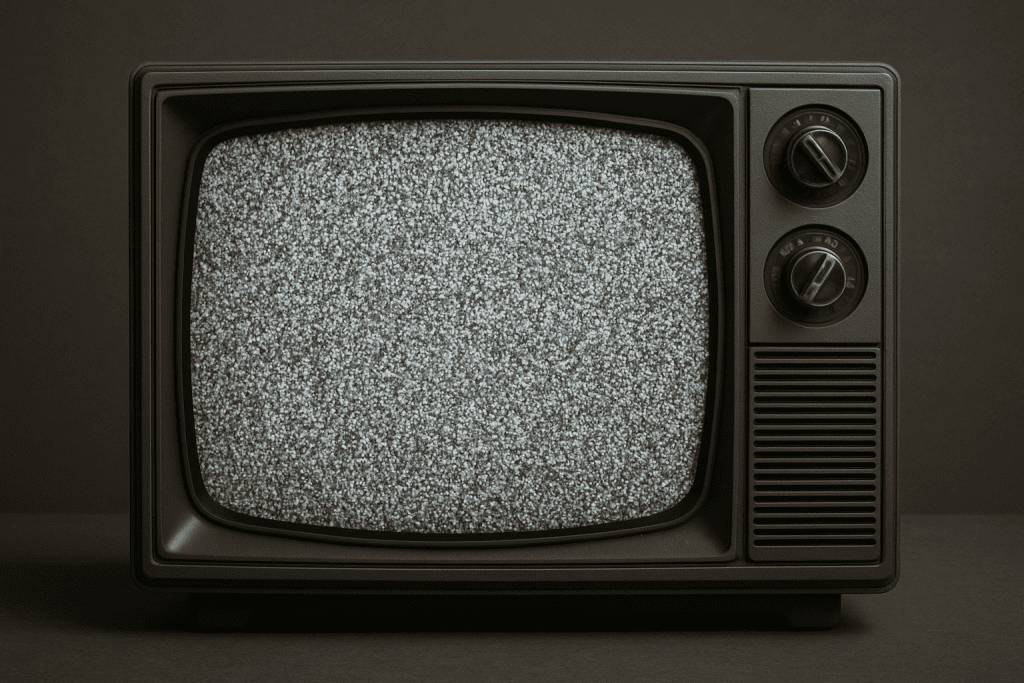
- It starts with a noisy picture (random dots everywhere, like static on an old TV).
- It slowly removes the noise.
- At each step, it adds details that match your text prompt.
- After many steps, the random dots turn into a clear picture.
To understand how simple this is, let’s compare it to cleaning a foggy window.
A fogged-up window looks blurry and messy. But if you wipe it slowly, little by little, shapes start to appear. Eventually, you see a crisp and clear scene behind the glass. Stable Diffusion does something just like that—except instead of wiping a real window, it’s “wiping” away noise using math.
Now let’s go deeper, step by step, in a way that’s easy enough for a kid to follow.
Step 1: The AI Starts With Random Dots
Imagine turning on an old TV with no channel. What do you see?
Static.
Noise.
Nothing meaningful at all.
Stable Diffusion begins its work exactly like that—with a picture full of random dots. Why? Because it’s going to transform that mess into something meaningful using your instructions.
This step might feel weird at first. Why not start with a blank page?
Well, a blank page doesn’t give the AI anything to change. But a noisy picture gives the AI something it can gradually clean up. Think of it like starting with a messy desk—you can tidy it until it looks neat. If the desk was empty, there’d be nothing to tidy.
So noise is the starting point because it allows the AI to sculpt something new from chaos.
Step 2: The AI Learns How the World Looks
Before Stable Diffusion ever tries to create an image for you, it spends a long time learning. It looks at millions of pictures and the words that describe them. From that, it learns patterns:
Cats often have whiskers.
Cars have wheels.
Trees have branches and leaves.
Mountains have rocky shapes and snowy tops.
People have faces with two eyes, a nose, and a mouth.
It doesn’t memorize individual photos. It memorizes patterns. Patterns are the building blocks of everything it will draw later. This is the same way you learn. For example, when you think of a dog, you don’t remember every single dog you’ve ever seen. You remember the general idea of a dog. The AI does the same thing.
After learning these patterns, the AI becomes amazingly skilled at imagining things—even things it’s never seen before—by combining patterns in creative ways.
That’s why if you ask for:
“A penguin swimming in a bowl of cereal,”
the AI can figure out what penguins look like, what cereal bowls look like, and how to put them together even though that combination is not common in real life.
This is the power of pattern learning.
Step 3: You Tell the AI What You Want
This is where the fun really begins. You type a text prompt—your instructions—and the AI uses those words to decide how to shape the final image.
Your prompt might be simple:
“A blue butterfly.”
Or complex:
“A glowing robot knight riding a giant hamster through a candy forest during sunset.”
No matter how strange or creative your idea is, the AI tries to follow your instructions. It turns your words into a list of features it needs to include.
If your prompt says “knight,” the AI recalls patterns related to armor, helmets, and shields.
If your prompt says “hamster,” it recalls fur texture, round bodies, small faces.
If your prompt says “candy forest,” it thinks of bright colours, swirly shapes, candy canes, and gumdrops.
And if your prompt says “glowing,” it adds light effects.
The AI doesn’t “understand” these things the way people do. But it knows what patterns usually match these words, and that’s enough to guide the picture creation.
Think of it like giving directions to someone who builds LEGO sculptures. You tell them what you want, and they assemble the LEGO bricks based on what they’ve learned. Stable Diffusion is your LEGO master builder.
Step 4: The Cleanup Process (The Heart of Diffusion)
Now comes the most interesting part—the diffusion process itself.
Diffusion is all about taking the noisy picture and gradually removing the noise while adding in the details that match your prompt.
At first, the picture still looks like nonsense. It’s just noisy fuzz. But the AI begins shaping it little by little.
In early steps, the AI nudges the noise so that certain areas start forming rough shapes.
In later steps, those shapes gain more detail—edges become clearer, colours become recognizable.
Toward the end, small details like texture, shadows, and reflections appear.
Finally, the noise is gone, the shapes are complete, and the picture looks just like the instructions asked for.
If you could watch the picture being created step by step, it would look like a dream slowly coming into focus. First blurry, then less blurry, then clearer, then detailed, then fully formed.
Here’s a simple analogy. Imagine your friend draws a picture like this:
- First, they sketch rough shapes.
- Then they add outlines.
- Then they add details.
- Then they add colours.
- Then they shade and polish.
Stable Diffusion does something similar—but instead of starting with rough shapes, it starts with random noise. Still, the idea is the same: each step improves the picture.
Why Noise Removal Feels Like Magic
Removing noise and replacing it with meaningful shapes is almost magical to watch. But underneath, it’s all math.
The AI has learned how noise should transform into patterns like cat ears, tree leaves, clouds, or whatever you’ve described in your prompt. So at each step, it asks itself:
“What should this tiny patch of noise become if the final image is supposed to show a cat? Should this part become fur? Should it become a paw? Should it become a shadow?”
It makes millions of tiny decisions—so many that your brain would explode trying to keep up. But for a computer, this is easy to do quickly.
After all these decisions, you get the final picture. That’s why diffusion is at the heart of Stable Diffusion.
Step 5: You Get Your Final Image
Once the AI has completed enough cleanup steps, the final image appears. It usually matches your prompt, though sometimes it surprises you. AI image generation isn’t perfect—and that’s part of the adventure.
Sometimes the AI adds little details you didn’t expect.
Sometimes it misinterprets part of your instruction.
Sometimes it nails your idea perfectly.
It’s like working with a magical assistant who tries their best but sometimes gets things a bit wrong.
What Can Go Wrong?
Because Stable Diffusion is guessing (based on patterns), it isn’t always flawless. You might see:
Hands with too many fingers
Faces that look melted
Objects merging together
Strange shadows
Odd expressions
This happens because the AI doesn’t actually understand the world. It doesn’t know how many fingers humans have. It only knows what hands usually look like in its training pictures. And if the pattern is slightly confusing, the AI may produce something strange.
Still, the results are usually great—and getting better all the time.
Why Stable Diffusion Is Special
Stable Diffusion became popular for several reasons:
It doesn’t require a huge computer to run.
People can use it on their home laptops.
It can create highly detailed images.
It’s flexible—you can generate art in many styles.
Artists and beginners alike can use it.
Earlier AI models needed giant servers and expensive hardware. Stable Diffusion changed the game by making image generation more accessible to everyone.
Let’s Explore Some Examples
Here are simple prompts and what Stable Diffusion tries to create:
Prompt: “A dog wearing a wizard hat.”
AI thinks: Dog pattern + hat pattern + magic theme → Creates a magical dog.
Prompt: “A castle floating on a cloud.”
AI thinks: Castle shapes + cloud textures + floating vibes → Makes a dreamy fantasy scene.
Prompt: “A cartoon banana playing guitar.”
AI thinks: Banana pattern + cartoon style + guitar shape → Banana musician.
Kids and adults can create entire worlds with just a sentence.
An Even Simpler Way to Think About It
Imagine Stable Diffusion as a chef with super powers. The chef has tasted every food in the world and knows every recipe. If you ask the chef:
“Make me a pizza, but with rainbow cheese and marshmallow pepperoni,”
the chef has never seen that dish before—but it knows what pizza looks like, what cheese looks like, what rainbows look like, and what marshmallows look like. So it mixes those patterns together to make something new.
Stable Diffusion does the same thing but with pictures instead of food.
A Kid-Friendly Analogy: Turning Sand Into Sculptures
Pretend the AI is an artist sculpting a statue from a giant block of sand. At first, the sand is shapeless. Then the artist starts carving:
First rough shapes.
Then arms and legs.
Then details on the face.
Then textures.
By the end, the sculpture looks lifelike.
Diffusion works exactly like this—except instead of sand, it sculpts noise into a picture.
What Makes a Good Prompt?
Your words matter. The clearer your instructions, the better the picture. Here are some tips for writing good prompts, even for kids:
Be specific: “A happy golden retriever jumping in a puddle” is better than “a dog.”
Add style: “In watercolor style” or “like a comic book.”
Add lighting: “Glowing,” “moonlit,” or “sunset.”
Add action: “Flying,” “dancing,” “running.”
With prompts, you’re the director and the AI is the artist.
How Long Does It Take for an AI to Make an Image?
Usually just a few seconds. But behind those seconds, the AI is doing thousands of tiny steps that your eyes never see. Modern computers are fast enough that this happens almost instantly, which makes it feel like magic even though it’s math.
What Are People Doing With AI Art Today?
Kids use it for school art projects.
Teachers use it to illustrate stories.
Gamers use it to design characters.
Writers use it to create book covers.
Businesses use it in marketing.
Movie makers use it for concept art.
Some people use it purely because it’s fun. AI image tools help make imagination visible.
Is It Safe for Kids?
The AI itself is just a tool, like a paintbrush or camera. But kids should use AI image generators with adult supervision because they can accidentally produce things you might not want to see. Most tools have filters to block inappropriate content, but an adult guiding the experience makes things safer and more meaningful.
A Table Summary of Everything We Covered
| Step | What Happens | Simple Explanation |
|---|---|---|
| 1. Start with noise | AI uses random dots | Like fuzzy TV static |
| 2. Learn patterns | AI studies images and words | Learns what things look like |
| 3. Read your prompt | AI turns text into instructions | “Make this for me, please.” |
| 4. Remove noise | AI shapes the image step by step | Like sculpting from a blob |
| 5. Final image | AI shows its creation | Your idea becomes a picture |
The Big Takeaway
AI image generation isn’t magic. It’s a clever process based on learning patterns, starting from noise, and slowly improving an image until it matches your words. Stable Diffusion is one of the easiest and most powerful ways to do this. What makes it exciting isn’t just that it can produce cool pictures—it’s that it makes creativity easier for everyone.
With just a few words, you can create a soaring dragon, a futuristic city, a dancing smoothie, or a superhero version of your dog. The only limit is your imagination.